Friday, June 25, 2010

Metawidget Present-It-Yourself

I've been asked for presentation material to help those wanting to promote Metawidget within their organisation, say at a Brown Bag Lunch. The material includes speaker notes and is available in two forms, including an OpenOffice version you can edit to your needs:

Also available through the Documentation page. Feedback welcome!

Wednesday, June 23, 2010

The Peril of the Passionate Programmer

For me, as I approach the end of any given day's programming, I am usually in one of two frames of mind:

  1. "Man, I've been chasing this bug for hours. I've been down so many dead-ends. I'm really frustrated. But by now my head is really deep in the code, so I'm in the best mindset to figure it out if I just keep going. I don't want to end the day like this."

  2. "Wow, today has gone really great. I'm on a roll. I've got lots done and I'm excited. I'd love to just add this, and this, and this before I go. I don't want to end the day like this."
So on a bad day, you don't want to stop. And on a good day, you don't want to stop. Rare is the average day, when you can just say:

  • "Today everything went about as well as expected. Nothing went really well, but nothing really badly either. I got done what I wanted to get done. Now's a good time to stop."
And that, as far as work/life balance goes, seems the peril of the passionate programmer!

Sunday, June 6, 2010

Pleasing Joe Nuxoll

Joe NuxollOn the latest episode of the Java Posse podcast Roundup '10 - Design vs Engineering, Joe Nuxoll - co-host and passionate UI designer who's worked for both Sun and Apple (and nobody can argue Apple know a thing or two about great UI design) - opens the podcast by saying:

"At least in my opinion, it's one of the core tenets of good UI design is that your internal data structure is not directly reflected in your UI. So you have to consider the use cases in your design flow, and you consider the best way, most efficient way to store the data and organize it in your back-end design - but the two of those should not be one-to-one mappings at all. Usually they're not"

Metawidget couldn't agree more.

Indeed, it's one of the main reasons we feel the Naked Objects approach to UI generation is impractical: really great UIs have a user-oriented model of the application space that is tailored to the user's way of seeing the world, and which does not necessarily match any internal domain model.

But let's be clear: this user-oriented model, although an abstraction of the underlying code, will have some kind of programmed representation. And you will need to map your UI widgets to that representation - be it a collection of lightweight POJOs, or some kind of XML definition, or something as simple as a Map. This representation may even be a mixture of UI-only classes and actual domain classes. For example, you may use an actual domain class 'Employee' but introduce a UI-only class 'EmployeeSearch' for an employee search screen.

Tor NorbyeSo while Metawidget does advocate removing the boilerplate code and error-prone tedium of using visual tools (like Matisse - sorry Tor) or UI languages (like Facelets) to duplicate UI definitions between back-end code and widgets, it does not advocate mapping directly to your domain model. It leaves that decision completely in your hands, by providing a rich array of plugins for different back-end architectures (POJOs, Scala objects, Struts XML files, etc) and a straightforward mechanism to add your own.

Dick WallOf course Joe, being passionate about his pixels, would also be pleased to hear Metawidget does this without hiding or restricting your existing UI framework. So you still use your preferred tools to get the exact look your users require, only now you can automate a lot of the drudgery. Building great UIs is both art and science. Metawidget does not attempt to address the art, it only automates the science. That is to say, it only tries to help the creation of those areas of UI design that are already rigidly defined - it does not overlap with those areas involving subjectivity, creativity or aesthetics. This may come as a blow to Dick Wall!

Finally I could mention that since Metawidget does all this at runtime, without any static code generation, your UIs automatically update in sync with changes to your back-end classes - saving you time and removing many categories of bugs. But since Joe long ago stopped wanting to do any coding, that discussion would probably put him to sleep :)


P.S. In case it's not obvious from some of the above jibes, I am a huge fan and long-time-listener-but-first-time-blogger of the podcast. Thanks for all the hard work guys!

Wednesday, June 2, 2010

Metawidget featured at JBoss World 2010


JBoss have announced that Metawidget will be showcased at a featured campground session at this year's JBoss World.

Pete Muir and myself will present a session where we'll discuss the pain of form development and what we can do about it:

  • Why current approaches to form development (visual tools like Matisse; UI languages like Facelets; code generators like Naked Objects) are unsatisfactory

  • How Metawidget enables you to use any combination of back-end technologies

  • How Metawidget enables you to use any combination of front-end technologies, including different UI frameworks and mixing third-party widget libraries

  • How Metawidget fits in with your existing UI design process, leveraging the full flexibility of your existing toolkit to create highly usable UIs
Hope to see you there!

Tuesday, May 11, 2010

Custom annotations: UiFacesComponentProperties

I was recently asked on the Metawidget forum whether we could have a @UiFacesComponentProperties annotation, so that you could fine-tune certain properties of a JSF component from within your business object.

In my opinion, this ties the business object a little bit 'too close' to the UI. However I realise that's a very subjective thing. So while Metawidget does not offer this 'out of the box', you can implement it quite easily. Here's how.

The Annotation

First, define the annotation...

package com.myapp;

import java.lang.annotation.*;

/**
 * Array of name/value pairs of arbitrary UIComponent properties.
 */

@Retention( RetentionPolicy.RUNTIME )
@Target( ElementType.METHOD )
public @interface UiFacesComponentProperties {
   String[] value();
}

...which you can use like this...

@UiFacesLookup( "#{feeType.summary}" )
@UiFacesComponentProperties( { "layout", "pageDirection" } )
public Set<FeeType> getExcludeFees() {
   return mExcludeFees;
}

The Inspector

Next, define an Inspector to detect this annotation and turn it into a Metawidget attribute...

package com.myapp;

import static org.metawidget.inspector.InspectionResultConstants.*;
import java.util.Map;
import org.metawidget.inspector.impl.*;
import org.metawidget.inspector.impl.propertystyle.*;
import org.metawidget.util.*;
import com.myapp.UiFacesComponentProperties;

public class MyAnnotationInspector
   extends BaseObjectInspector {

   public CoreAnnotationInspector() {
      this( new BaseObjectInspectorConfig() );
   }

   @Override
   protected Map<String, String> inspectProperty( Property property )
      throws Exception {
      Map<String, String> mapAttributes = CollectionUtils.newHashMap();

      UiFacesComponentProperties componentProperties = property.getAnnotation( UiFacesComponentProperties.class );

      if ( componentProperties != null )
         mapAttributes.put( "faces-component-properties", ArrayUtils.toString( componentProperties.value() ) );

   }
}

...and add it into your CompositeInspector chain.

The WidgetProcessor

Finally, declare a WidgetProcessor to act on the Metawidget attribute...

package com.myapp;

import static org.metawidget.inspector.InspectionResultConstants.*;
import static org.metawidget.inspector.propertytype.PropertyTypeInspectionResultConstants.*;
import java.lang.reflect.Method;
import java.util.*;
import javax.el.ValueExpression;
import javax.faces.component.*;

import org.metawidget.faces.component.*;
import org.metawidget.util.*;
import org.metawidget.widgetprocessor.iface.WidgetProcessor;

public class MyWidgetProcessor
   implements WidgetProcessor {

   @Override
   public UIComponent processWidget( UIComponent component, String elementName, Map<String, String> attributes, UIMetawidget metawidget ) {

      List<String> listComponentProperties = CollectionUtils.fromString( attributes.get( "faces-component-properties" ));

      for ( int loop = 0, length = listComponentProperties.size(); loop < length; loop += 2 ) {
            ClassUtils.setProperty( component, listComponentProperties.get( loop ), listComponentProperties.get( loop + 1 ) );
      }

   }
}

...and add both into your WidgetProcessor list in WEB-INF/metawidget.xml:

<htmlMetawidget xmlns="java:org.metawidget.faces.component.html">
   <inspector>
      <compositeInspector xmlns="java:org.metawidget.inspector.composite" config="CompositeInspectorConfig">
         <inspectors>
            <array>
               ...
               <myAnnotationInspector xmlns="java:com.myapp"/>
            </array>
         </inspectors>
      </compositeInspector>
   </inspector>
   ...
   <widgetProcessors>
         <array>
            ...
            <myWidgetProcessor xmlns="java:com.myapp"/>
         </array>
   </widgetProcessors>

Note this version will only work with String properties, and you might want to disable it for read-only scenarios (TRUE.equals(attributes.get(READ_ONLY))), but I'll leave it simple for now.

Feedback welcome!

Sunday, May 2, 2010

UI Generation Sucks!

I thought I'd do a blog post about common objections and preconceptions to UI Generation and how Metawidget tries to address them:

Code Generation Sucks!

The Preconception
Static code generation is notorious for generating reams of poorly written, poorly documented and poorly tested code. It's very impressive to be able to click a few buttons and suddenly have a runnable project appear, but less impressive when you realize you have to understand and maintain that code for the rest of your application's life.

And, generally speaking, the re-generation story is not a good one: if you make anything more than a trivial change to the generated code, you can't expect the static code generator to help you much further.


Metawidget's Approach
Metawidget doesn't generate any static code. It's a purely runtime-based approach. In a similar way to how JPA generates SQL on-the-fly rather than, say, pre-building lots of stored procedures, Metawidget inspects objects (not classes) and dynamically creates UI wigets at runtime.


Generated UIs Suck!

The Preconception
Most of the usability aspects of an application's front-end are not stored anywhere in its back-end architecture. So if you try and generate a UI purely from the back-end, you invariably end up with something that looks very generic. For example, perhaps you'll generate a 'UI screen per business class', with Create, Retrieve, Update and Delete (CRUD) functionality for each:
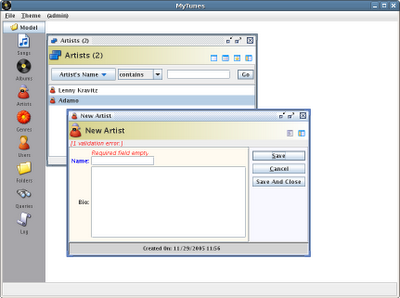

This is simply not how most users want their UIs to look.


Metawidget's Approach
Metawidget does not try and generate your entire UI. It focuses purely on being 'another widget in your toolbox'. It'll render the inside of a form for you (because the field names, and types, and constraints really are stored in the back-end), but it'll leave everything around the form - including appearance, navigation and usability - firmly in your hands.

By not trying to generate too much, Metawidget becomes more useful to more projects.
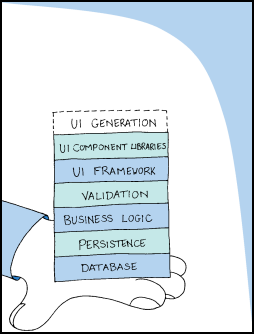


Won't work for me - I have a specialized back-end architecture!

The Preconception
Given the massive number of different frameworks out there, everything from validation engines to persistence layers to BPM, every project ends up having a subtly different architecture. This architecture is based on choices made by the development team as to what suits their needs best.

Any UI generator that tries to dictate your back-end architecture is unlikely to be a good fit.


Metawidget's Approach
Metawidget does not try to dictate your back-end architecture. It comes with plug-ins for many different kinds of existing technologies, and makes it easy to mix them together or add your own.


Won't work for me - I have specialized widget libraries!

The Preconception
Given the massive number of UI frameworks out there, many projects will choose different UI toolkits. And some projects will even choose multiple - say if you're targeting both Web and mobile platforms.

Any UI generator that tries to dictate your UI framework is unlikely to be a good fit.


Metawidget's Approach
Metawidget does not try to dictate your front-end architecture. It comes with plug-ins for many different kinds of existing UI frameworks (including third-party widget libraries), and makes it easy to mix them together or add your own.

Saturday, May 1, 2010

Model Driven User Interface: Metawidget v0.95

Version 0.95 of Metawidget, the model driven user interface tool, is now available. This release includes the following enhancements:
Special thanks to Stefan Ackermann for his contributions to this release, and to Nebojsa Cvijovic for his help testing!

As always, the best place to start is the Reference Documentation:

http://metawidget.org/doc/reference/en/pdf/metawidget.pdf

Your continued feedback is invaluable to us. Please download it and let us know what you think.

Breaking Changes

There have, unfortunately, been some minor breaking changes with this release compared to v0.9. Specifically:

  • Many Basexxx classes have been removed in favour of a 'simplified' interface and an 'advanced' interface. For example there is no BaseWidgetProcessor any more - there is just the WidgetProcessor interface and an AdvancedWidgetProcessor interface. All the 'simplified' interfaces have only one method. This was done in preparation for automatic function objects (closures) in Java 7